


Highlights:
- Google Photos backup settings redesigned with Material 3 Expressive UI
- Easier navigation with organized headings and containers
- New “Backup Schedule” option may let users choose when to save photos
- Feature could reduce data usage and improve flexibility
- Official rollout date still unknown
A Fresh Design for Backup Settings
Google Photos is preparing a major update to its backup settings, and users are excited about what’s coming. The app is adopting Google’s new Material 3 Expressive design language, which brings a cleaner, more modern look to the settings screen.
According to reports, the backup settings page has been reorganized with clear headings such as Backup Method, Backup Target, and Backup Tool. Options like backup mode, photo quality, and folder selection are now displayed in separate containers, making the interface easier to understand and more intuitive to use.
While the visual changes may seem modest, they are expected to improve usability for millions of people who rely on Google Photos every day.
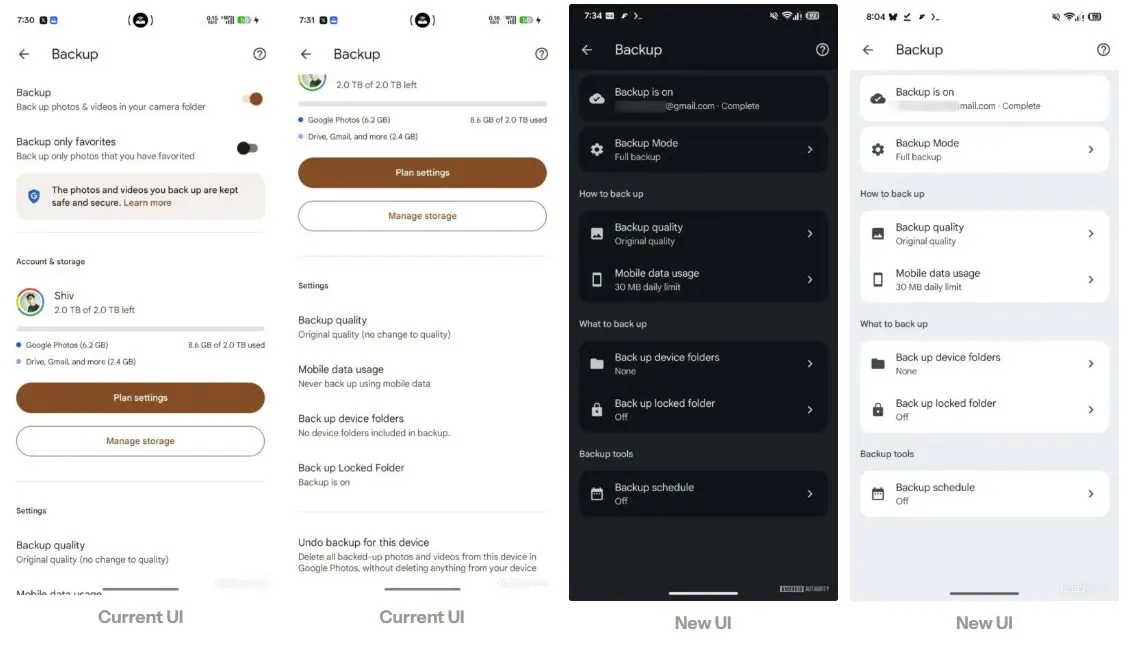

The Game-Changer: Backup Schedule
The most exciting addition is a new option called “Backup Schedule.” Until now, Google Photos automatically backed up images without giving users control over timing. This new feature could allow people to set specific backup times — daily, weekly, or monthly — or even choose time zones.
For example, users might schedule backups only at night when connected to Wi‑Fi, reducing mobile data usage. This flexibility has been one of the most requested features for years, and its arrival could make Google Photos far more user‑friendly.
Why It Matters
Many users have long wanted more control over backups. Whether it’s saving bandwidth, avoiding interruptions during the day, or ensuring photos are uploaded only under certain conditions, the ability to schedule backups adds a layer of convenience.
As automobile blogger Sujit Ram, I believe this update reflects Google’s effort to listen to user feedback and improve everyday usability. If implemented, it will make Google Photos not just a storage tool but a smarter companion for managing memories.
Availability Still Unclear
At this stage, Google has not confirmed when the new backup schedule feature will officially roll out. Since the redesigned settings are already appearing in app updates, it’s likely that the scheduling option will be introduced gradually in future releases.
With Google Photos being one of the most widely used apps worldwide, this change is expected to attract significant attention once it becomes available.